Air Drift for ESP32-S3
A little radio for the whole world. Free firmware that turns a small ESP32-S3 board into an internet radio with a round touch screen, playing 61,997 stations from 241 countries. Press Drift and it lands on a station somewhere on Earth. No account, no app, no subscription.
For the Waveshare board, plugged in by USB. Chrome or Edge, on Windows, macOS, Linux or ChromeOS.
What you get
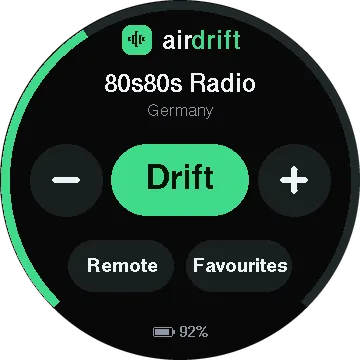
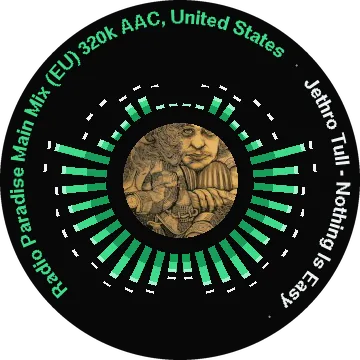
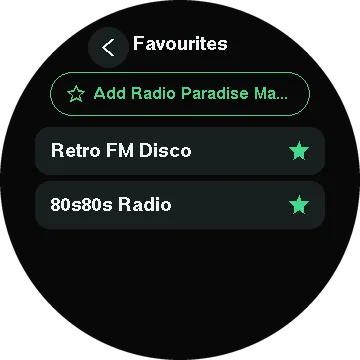
Give it your WiFi and press Drift: it picks a country, weighted by how many stations it has, and lands on one of its most played, straight from the station's own stream. A station that does not answer is drifted on from. Star the ones you like and they wait in Favourites. Left alone while it plays, the screen becomes a visualiser: the music radiating from the song's cover, or the station's logo, with the station and the song running round the rim.
The radio has its own web page on your network, for searching everything from a phone or laptop; the Remote button shows its QR code. The button on the side opens a menu for a new WiFi network or a reset. On a battery it learns the battery's own curve, and plugged in to charge it shows the charge instead of starting the radio. It remembers what it was playing and updates itself over WiFi.
On the desk
The radio on a desk, playing 80s80s Radio from Germany, with the station and the song running round the rim. A tap brings the controls back. Drift tunes, and a few seconds later it is Jacaranda FM in South Africa.
VisualiserTapDriftSomewhere new
What you need
The Waveshare ESP32-S3-Touch-LCD-1.85 (either revision): a round touch screen with sound built in, so there is nothing to solder. Add a small speaker for its speaker connector, a USB-C cable and, if you like, a battery.
Install it
- Connect the board to a computer by USB.
- In Chrome or Edge, press Install on my board above, pick the board's port, and wait a minute while it writes.
- When the screen lights up, scan its QR code with your phone and pick your WiFi.
- Press Drift. Or open
http://airdrift.localon the same network to search all of Air Drift from a phone or laptop.
Or with esptool, from a terminal
pip install esptool
curl -LO https://github.com/Air-Drift/ESP32-S3/releases/latest/download/airdrift-waveshare-185-full.bin
esptool --chip esp32s3 --baud 921600 write-flash 0x0 airdrift-waveshare-185-full.bin
Either way the one image holds everything the board needs, so it works on a board that has never run Air Drift. Later versions install from the Device tab on the radio's web page, with no cable. Installing again starts afresh: the radio forgets its WiFi, but keeps its favourites.
Build your own
The same firmware runs a radio you put together yourself: an ESP32-S3 dev board with PSRAM, a DAC, an amplifier, two speakers, a volume knob and two buttons, all on one USB-C charger. It takes some soldering. The parts list and the wiring are on GitHub, and it installs from here too:
The rest
The web page, the console, the API, building from source and the release notes are in the project on GitHub. The firmware is open source under the MIT licence. The installer is ESP Web Tools.
Waveshare and Espressif have no part in Air Drift.